Skip to content

AI code review that never leaves your machine.

RADAR turns open pull requests in Azure DevOps and GitHub into structured, evidence-backed review packs — using your own local LLM through LM Studio, Ollama, or any OpenAI-compatible endpoint. Turn on monitoring and review packs are already waiting in your inbox when you sit down. You stay the reviewer.

Local only No account · No telemetry · Works offline
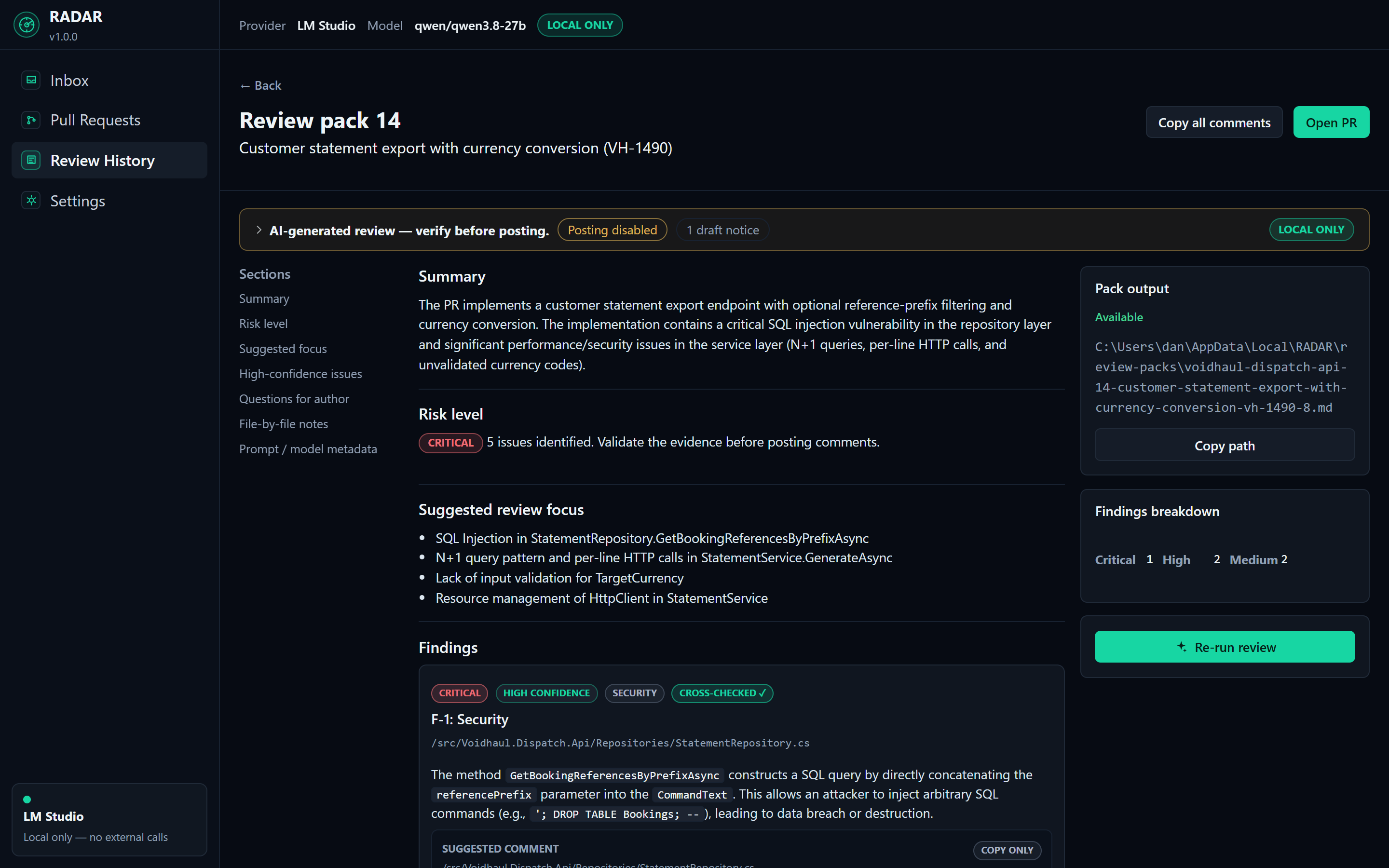
review-pack.md — RADAR
A RADAR review pack: findings with severity and confidence badges, evidence from the diff, and copy-ready comments Click to enlarge

Code review is the bottleneck in most teams — PRs queue for days while the people who could review them are busy writing more code. Cloud AI reviewers exist, but they are a non-starter the moment your code cannot leave the building. And if you are on Azure DevOps, every AI review tool on the market seems to pretend you do not exist.

How it works

Three steps, no pipeline changes

01 · Connect

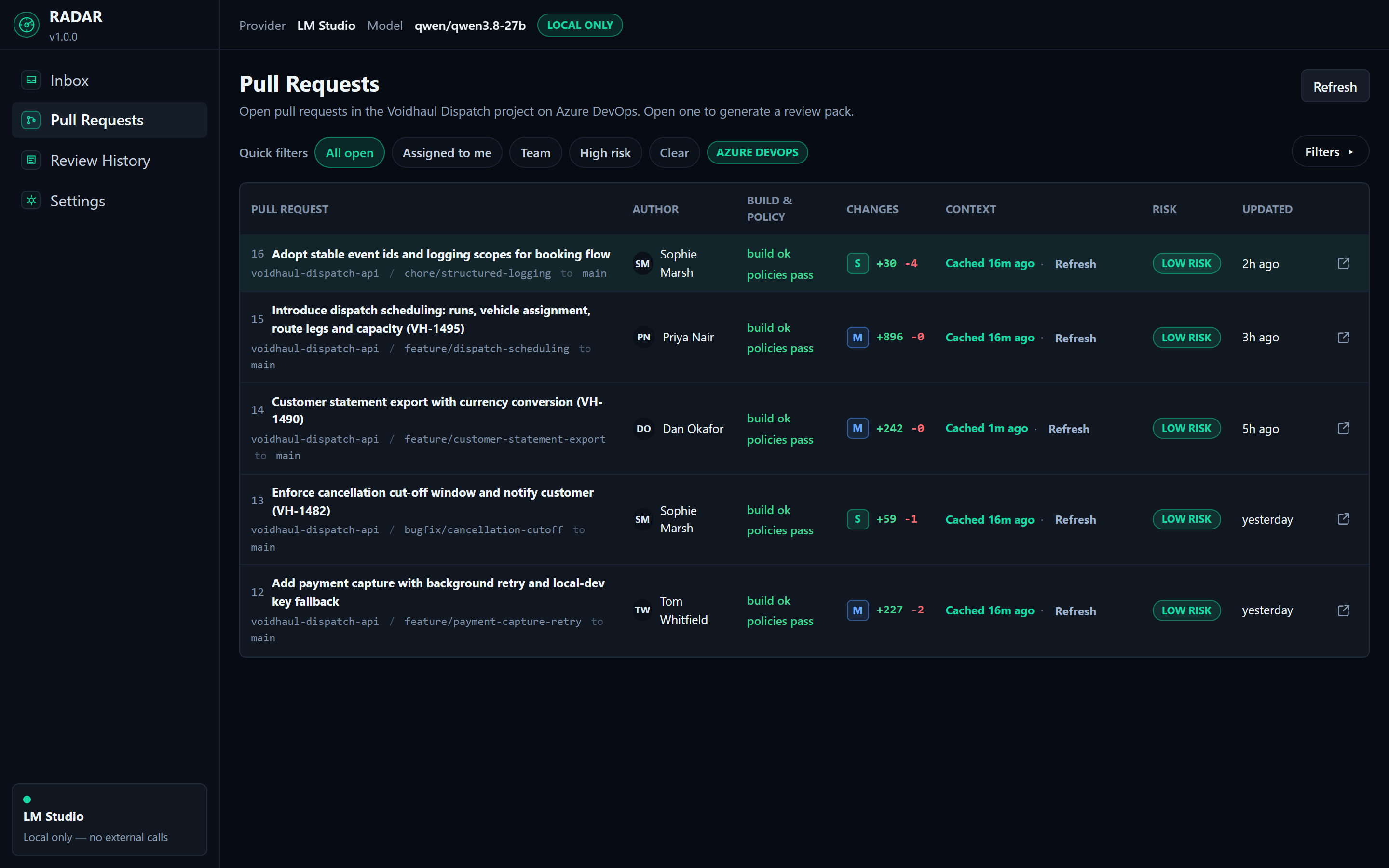
Point RADAR at your Azure DevOps project or GitHub repos with a PAT. Stored encrypted, local only.

RADAR — Pull Requests
RADAR listing open pull requests from a connected Azure DevOps project, with build status, change size, and risk Click to enlarge

02 · Review

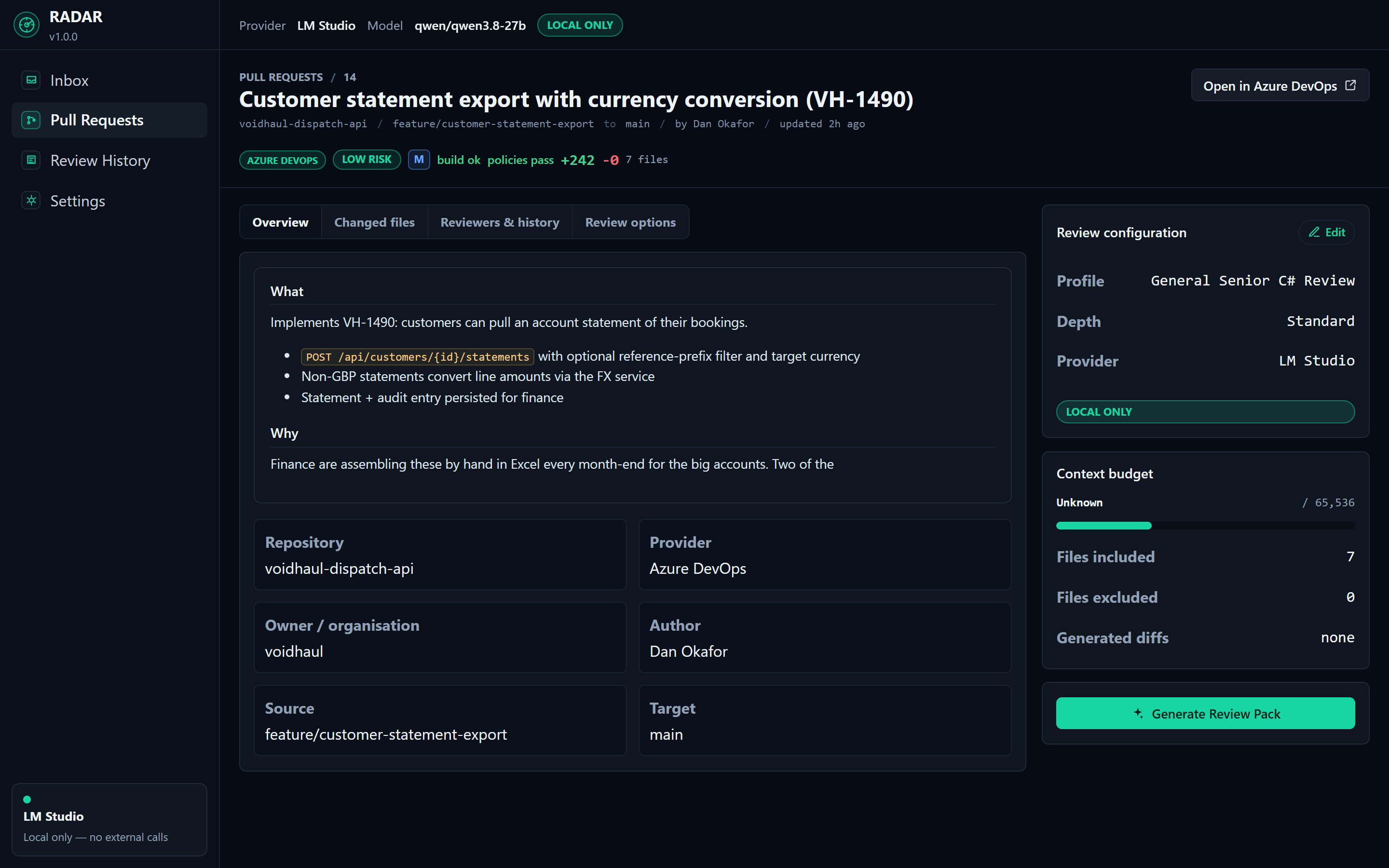
Pick a PR, pick a depth, generate. RADAR builds a bounded context, runs your model, and produces a structured review pack: findings with severity, confidence, and evidence from the actual diff.

RADAR — PR detail
RADAR pull request detail with review depth options and file coverage Click to enlarge

03 · Act

Read the pack, copy the comments you agree with, post the ones you choose — with explicit confirmation, duplicate protection, and an AI-assisted marker. RADAR never approves, rejects, or merges.

RADAR — Review pack
A generated review pack with findings, severity badges, and copy-ready suggested comments Click to enlarge

The Inbox

Reviews that are ready before you are

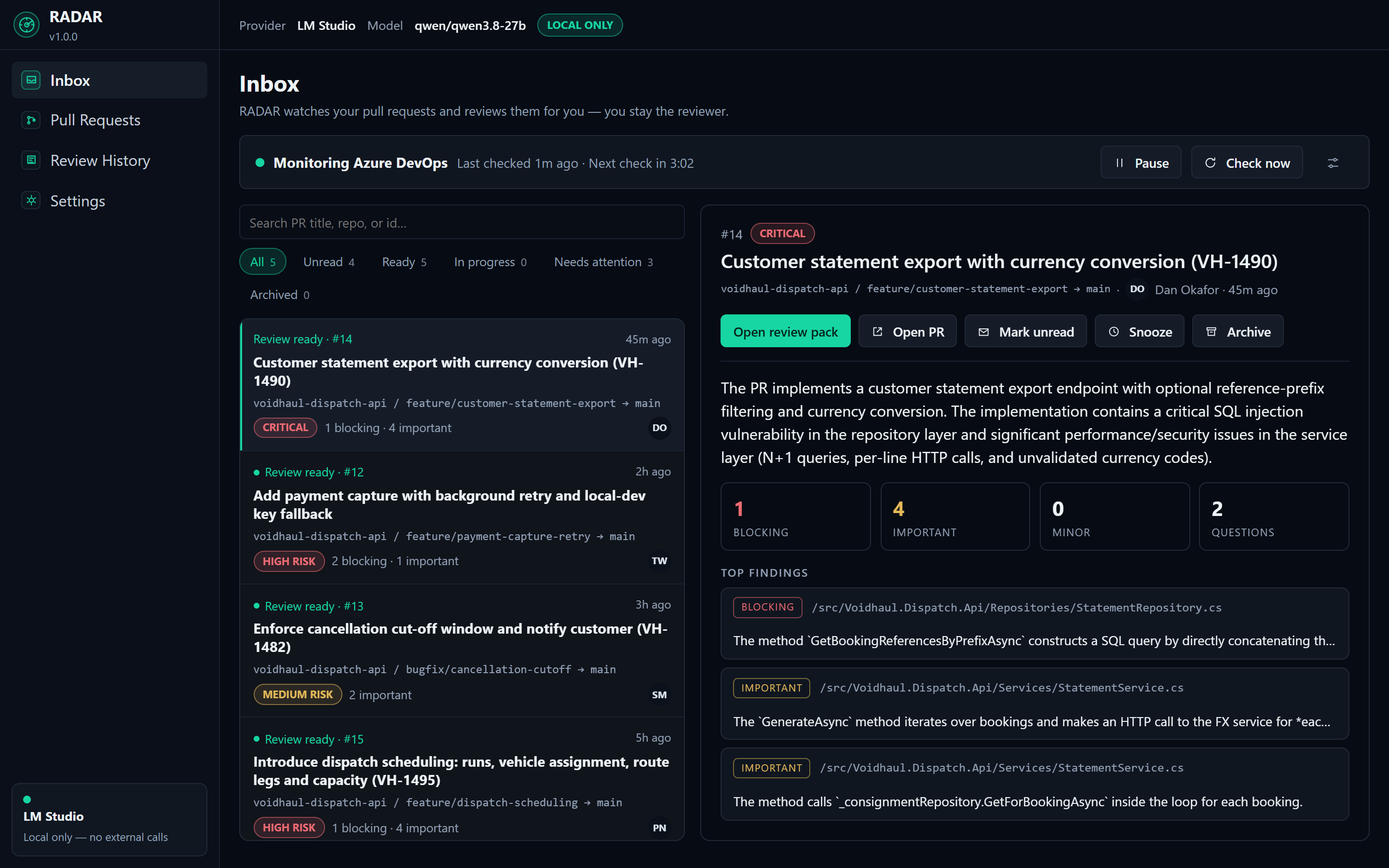
Turn on monitoring and RADAR watches your pull requests while the app is open: it polls Azure DevOps or GitHub every few minutes, spots new and updated PRs, and queues reviews by your rules — per-repository control, skip drafts, cap the PR size, re-review when new commits land.

When a pack is ready you get a Windows notification and a triageable inbox item: risk level, finding counts, the top findings, and a one-click jump into the full review pack. Reviews run one at a time, and nothing is ever posted anywhere.

Monitoring is opt-in and automatic review is off by default — if your model endpoint costs money, RADAR never spends it without being asked. On a local model, unattended reviews cost you nothing.

RADAR — Inbox
The RADAR Inbox: monitoring status row, triageable list of finished reviews with risk levels and finding counts, and a preview pane showing top findings Click to enlarge

Governance

Your code stays yours.

  • Nothing leaves the machine by default — reviews run against the model host you control.
  • Explicit, per-run confirmation before any external provider is used.
  • Secrets stored DPAPI-encrypted — PATs and API keys never sit in plain text.
  • Output is plain Markdown on your disk — your review history is yours to keep, grep, and archive.
  • No account, no telemetry, no vendor lock-in.
  • If your security team's answer to cloud code review is "no" — RADAR is the tool that doesn't need to ask.

Features

Built for real review work

Proactive review inbox

RADAR watches your PRs and queues reviews by your rules — packs are waiting when you sit down.

Multi-pass review for large PRs

Chunks big diffs, summarises the routine, deep-reviews the risky.

Evidence-linked findings

Every finding cites the hunk it came from — no hand-waving.

Author opinion packs

An "is this ready?" pre-review for your own PR before you ask a human.

Controlled comment posting

Per-comment confirmation, duplicate protection, and an audit trail.

Review profiles

Security, performance, tests, architecture — or balanced senior review.

Review history on your disk

Plain Markdown packs, saved locally, no cloud copy.

BYO model, BYO hardware

LM Studio, Ollama, or any OpenAI-compatible endpoint you run.

Azure DevOps and GitHub

First-class ADO support — the audience everyone else skips.

For developers

Get a careful pre-review before you ask a human — catch the race condition before your tech lead does.

For engineering managers

Raise review throughput and consistency without sending a line of code to a third party — and without another per-seat subscription.

Real output

This is what a review pack looks like

Generated in 47s on an RTX 4080 with Qwen3 32B via LM Studio

RDR-1

Concurrency

High High confidence

src/HookRelay/Dispatch/WebhookDispatcher.cs` line 91 · @@ -74,6 +82,24 @@

`_attemptCount` is an instance field on `WebhookDispatcher`, which is registered as a singleton. Two webhooks being delivered concurrently share the same counter, so a delivery can be abandoned after zero retries because a different delivery already consumed the attempts. Under load this silently drops events — the exact scenario the PR is meant to fix.

Suggested comment

`_attemptCount` is shared across all concurrent deliveries because the dispatcher is a singleton. A burst of failures on one endpoint will exhaust the counter for every in-flight delivery, so some webhooks get zero retries. Consider tracking the attempt count per delivery — e.g. a local variable in `DispatchAsync` or a field on `DeliveryAttempt` — instead of dispatcher state.

RDR-2

Resource Management

Medium High confidence

src/HookRelay/Dispatch/WebhookDispatcher.cs` line 118 · @@ -104,3 +126,12 @@

`SendAsync` constructs a new `HttpClient` for every attempt. With retries this multiplies the problem: a single failing endpoint now creates up to four clients per event. Disposed `HttpClient` instances hold sockets in TIME_WAIT, so sustained retry traffic risks socket exhaustion on busy relays.

Suggested comment

`new HttpClient()` per attempt will exhaust sockets under sustained retry load — each disposed client parks a socket in TIME_WAIT. Inject `IHttpClientFactory` (already registered in `Program.cs`) and create the client from the factory, or hold a single static client with a `PooledConnectionLifetime`.

RDR-3

Correctness

Low Medium confidence

src/HookRelay/Dispatch/RetryPolicy.cs` line 21 · @@ -0,0 +14,10 @@

`NextDelay` computes `BaseDelay * 2^attempt` but never applies `_options.MaxBackoff`, although the option is defined and documented in `DispatchOptions`. At the default 2s base, attempt 3 already waits 16s; if `MaxAttempts` is raised in configuration the delay grows unbounded and deliveries can hang far beyond the endpoint's expectations.

Suggested comment

`NextDelay` ignores `MaxBackoff` — the computed delay should be clamped: `TimeSpan.FromTicks(Math.Min(delay.Ticks, _options.MaxBackoff.Ticks))`. Worth a test at the boundary, since `MaxBackoff` is documented as a hard cap in `DispatchOptions`.

Pricing

One-time purchase. No subscription, ever.

Personal

$59 / £49 · one-time

  • One developer, personal or freelance use
  • 12 months of updates
  • Perpetual fallback — your version is yours forever
  • Offline license key

Team

$119 / £99 per seat · minimum 2 seats

  • Company use
  • Invoice, PO, and VAT receipt
  • Priority email support
  • 10+ seats: talk to us — by email, not a sales call

One-time purchase · 14-day full trial · Keys work offline · No subscription, ever

FAQ

Questions a sensible person would ask

Which models work?

Anything you can serve through LM Studio, Ollama, or an OpenAI-compatible endpoint — including OpenAI and Azure OpenAI if your policies allow external providers. Local models in the 14B–32B range (Qwen3, Llama, Devstral) produce solid review packs; larger models produce better ones. The sample review on this site lists exactly which model and hardware produced it.

What hardware do I need?

For local review: a GPU with 12 GB+ VRAM (or an Apple-silicon-class machine with 32 GB+ unified memory) runs mid-size models at usable speeds. Smaller hardware works with smaller models — expect shallower findings. RADAR itself is a lightweight Windows app; the model host does the heavy lifting and can be a different machine on your network.

Does any code leave my machine?

Not by default. With a local provider (LM Studio, Ollama, or any endpoint you host), nothing leaves your machine or network. If you configure an external provider such as OpenAI, RADAR warns you and requires explicit confirmation before every run, and every review pack records whether code may have left the machine.

Does it work with Azure DevOps Server / on-prem?

RADAR targets Azure DevOps Services (dev.azure.com) and GitHub today. Azure DevOps Server support is on the roadmap — it uses the same REST API family, and on-prem shops are exactly who RADAR is built for. Tell us you need it via the email list and it moves up.

Can it post comments automatically?

No — and that is deliberate. RADAR generates suggested comments; you choose which to post, each one requires explicit confirmation, duplicates are detected, posted comments carry an AI-assisted marker, and an audit log records what was posted. RADAR never approves, rejects, or merges a PR. You stay the reviewer of record.

Does it review PRs automatically?

It can. Turn on monitoring and RADAR polls Azure DevOps or GitHub while the app is open, detects new and updated pull requests, and queues reviews according to your rules — per-repository toggles, skip drafts, a size cap, re-review when new commits are pushed. Finished packs land in an inbox with a Windows notification. Both monitoring and auto-review are opt-in: unattended generation against a paid endpoint should be a decision, not a surprise. Reviews run one at a time, and automatic runs are labelled in your review history.

Windows only?

Yes, Windows first — that is where the Azure DevOps audience lives. The core is cross-platform .NET, so macOS/Linux builds are feasible later, but we would rather ship an excellent Windows app than three mediocre ones. No promises on dates.

How is it licensed?

A one-time purchase: Personal $59 and Team $119 per seat (minimum 2). Every license includes 14 months — 12 months — of updates and works offline: keys are cryptographically signed and verified on your machine. RADAR never phones home. A full-featured 14-day trial needs no account and no card.

What happens when my update year ends?

Your version keeps working forever — that is the perpetual fallback. You simply stop receiving new releases. If you want another 12 months of updates it is 50% of the original price ($29 personal / $59 per team seat), entirely optional.

Be first to run a local review.

Launching soon — the email list gets 25% off at launch. Release notes and launch news only.

Double opt-in — you confirm by email before anything is sent. Or use the hosted signup page.